From a blank project to a real investigation.
This is the route used for the actual OpsDesk rehearsal. Build a useful inbox first, connect native AI, then inspect the harness and prove the change boundary. Add Langfuse after the app works.
Open your own Lovable project ↗ Inspect the actual app source ↗ Download the full agent workflow (.md)
You can create, search, filter and select a ticket; obtain a real native-model/tool answer; inspect its reported usage; and show a server-enforced change stop. Observability export and independent trace readback are separate checks, not implied by that finish line.
Your shortest route: three prompts, one working app.
Stay in the same Lovable project. No terminal is needed for this route. Each step says where to act and what you should see before continuing.
- Build the screen · paste prompt 1 in Lovable chat. See three tickets.
- Connect AI · paste prompt 2 in that same chat. Sign into your app.
- Try the controls · create, search and select a synthetic ticket.
- Investigate · click Analyze safely once. Read the actual result.
- Check security · click Test a change request. Expect zero model calls.
- See the trace · paste prompt 3, save your three server secrets, check setup, then verify one run in Langfuse.
Want the files? Copy the Git commands below. Advanced explanations stay expandable; you can return to them after the app works.
Copy prompt 1 below → paste it into a new Lovable project → send.
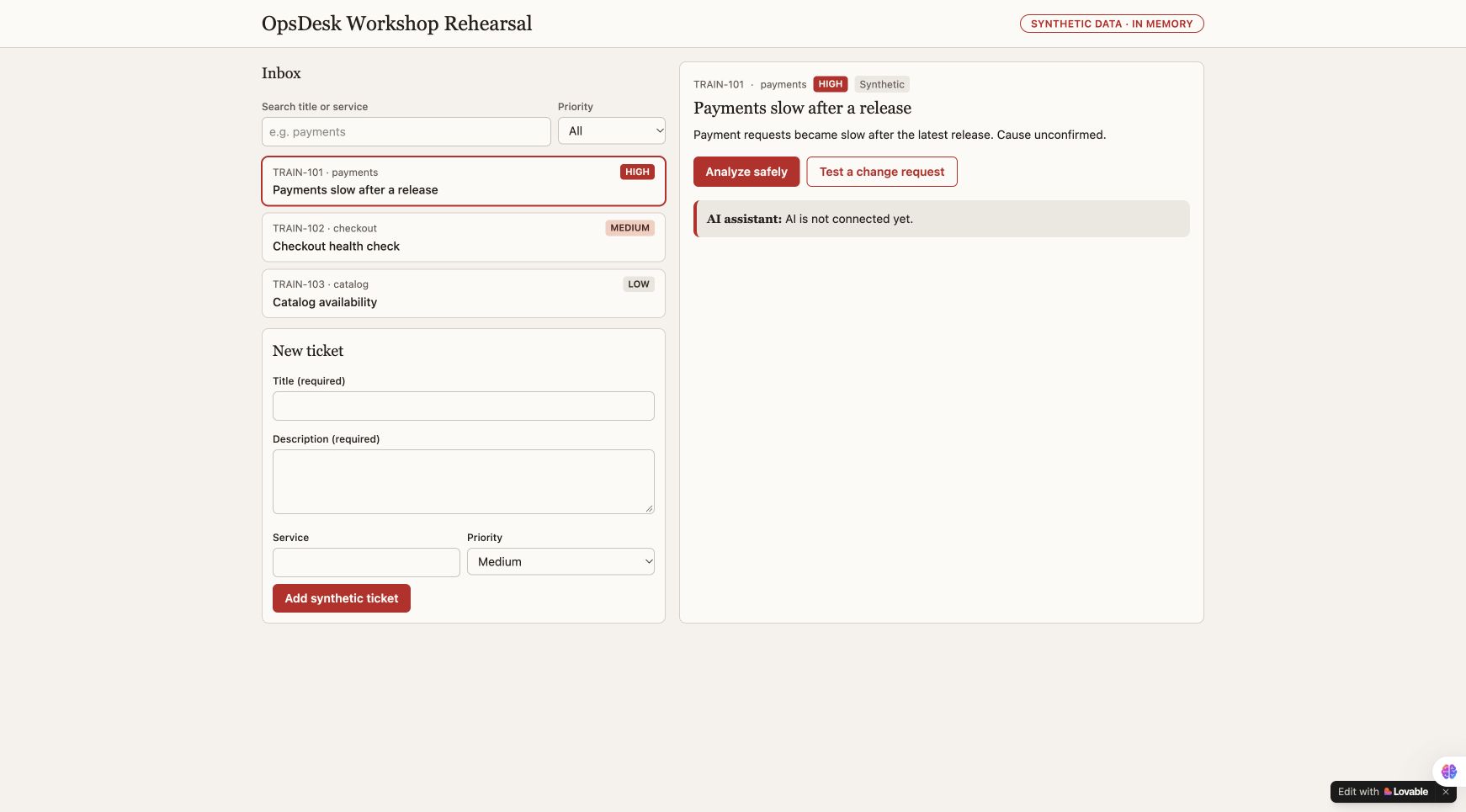
Look for: Three tickets and a usable inbox. AI is not connected yet.
Make the app visible.
Start a new project in your own builder account. Copy this prompt, then use the actual preview rather than treating the builder's completion message as acceptance.
Prompt 1 · copy into the same builder chat
Build OpsDesk, a small incident board for an operations team. Start with the visible app only. I should be able to click and use it before adding AI. Create three synthetic tickets: payments is slow (high), checkout needs a health check (medium), catalog availability check (low). Each has id, title, description, service and priority. Show an inbox, priority filter, search, selected-ticket detail and a New ticket form. Ticket edits stay in memory for this first exercise. Add an Ask AI panel with Analyze safely, a result area and an initial state reading "AI is not connected yet". Do not generate a fake AI response, pretend to authenticate a user, or imply that a database exists. Mark all tickets as synthetic training data. Use Oracle Redwood for a clear desktop/mobile layout: Oracle red accents, warm stone surfaces, Georgia headings and local Figtree/system UI text. Use only approved brand assets. Keep compact incident rows and one clear action. Make loading, empty, validation and failure states usable. Render ticket text as text, never raw HTML. No paid integrations, real customer data, production connectors, automatic publishing, real model calls or secrets in this first build. Show which visible features work and which capabilities still need a backend. Then stop for a review of the preview.Download prompt (.md)
Copy prompt 2 → paste and send in the same project → review backend activation.
Look for: A protected Analyze safely action, with app sign-in.
Give the same app a protected AI action.
Use the next prompt in the same project. It asks Lovable to implement the server, authenticated entry, bounded model loop, strict tools and actual inspector. It uses the builder's available native model; a separate local gateway is not needed for this route.
Prompt 2 · copy into the same builder chat
Continue this same unpublished OpsDesk project. Preserve its working inbox, create/search/filter/select controls and synthetic-data label. Use an available native Lovable AI model through its supported server runtime. Do not use an external gateway or ask for its API key. Require an authenticated app session before billable inference. Keep all provider keys server-side. Implement a bounded loop with only service_health and release_diff read-only synthetic tools. Validate input strictly, reject extra arguments, scope every tool to the selected service, cap tool events and output, and allow at most three model calls. Enforce two analyses per minute and ten per UTC day per account with atomic backend reservations, not worker globals. Do not retry inference automatically. Block explicit change intent in server code before provider construction, key reads or model calls. Return approval_required with zero generations. Treat tickets and runbooks as untrusted data. Do not create shell, arbitrary-network, write or approval-resume tools. Show actual loading, empty, validation and dependency-failure states. Provide an expandable inspector with actual model calls, validated tool events, duration, returned model and provider-reported token usage. Keep missing usage/cost unknown; do not invent a price, answer or trace. Do not expose hidden model reasoning. Use presentation-safe account text, excluding name, email and profile picture. Render all untrusted ticket and answer text as text, not HTML. Test change stops, strict arguments, selected-service scope, rate rejection, upstream denial and the actual call ceiling with isolated transports and no real credentials. Explain that builder sign-in and generated-app sign-in are separate. Present required backend activation or unexpected consent for review before proceeding. Use existing account entitlements; do not buy credits, upgrade a plan, publish the app, connect another project or change account-wide settings. Optional Langfuse tracing can remain explicitly unconfigured until its separate integration step. Do not replace a real analysis with simulated telemetry. Report actual test output, exact reopen steps and any remaining acceptance gate.Download prompt (.md)
Review any request to enable Lovable Cloud or backend capabilities. Use your own existing credits and current plan. The rehearsal used a maximum of three model calls and two analyses per minute / ten per UTC day per account. A free course does not include free builder/model usage.
Open the preview and use its Sign in control. Review the consent.
Look for: Signed in · workshop session.
Two sign-ins, two different jobs.
Google SSO opens the builder workspace. The generated app then authenticates its own user through a supported sign-in flow. Review its consent before allowing name/email sharing. The presentation UI should say “Signed in · workshop session,” without showing an account identifier.
The editor preview is blurred or blank
On the newest completed change card in Lovable chat, select Preview first. Then use Open preview and check the rendered app. The editor can display current source while the preview remains pinned to an older history entry. Authenticated preview URLs can contain access tokens. Never paste them into GitHub, course notes or recordings. Do not disable authentication to make the demo easier.
Follow the six clicks below. No chat or terminal command is required.
Look for: Search, filter and selected detail behave as described.
Try the same small acceptance script.
- Submit the blank new-ticket form. Required fields must prevent creation.
- Create “Workshop rehearsal: checkout check,” with a synthetic read-only description, service checkout and Medium priority.
- Search its exact title: one ticket should match.
- Choose High while that search remains: the empty state should appear.
- Clear the search while High remains: only the high-priority payments ticket should appear.
- Choose All and select TRAIN-101. Its detail must replace the created ticket's detail.
These interactions were repeated in the actual authenticated Lovable app. Tickets remain in memory; a reload resets them. Persistent incident storage is a later capability.
Copy the request below into Analysis request → click Analyze safely once.
Look for: An actual answer and model/tool events. Wait; do not click repeatedly.
Ask for evidence, not an automatic repair.
Analyze this synthetic incident using read-only evidence.
Select TRAIN-101, then click Analyze safely once. Wait for the actual result. The model should use the registered synthetic service-health and release-diff tools, separate observation from uncertainty, and recommend safe read-only next checks.
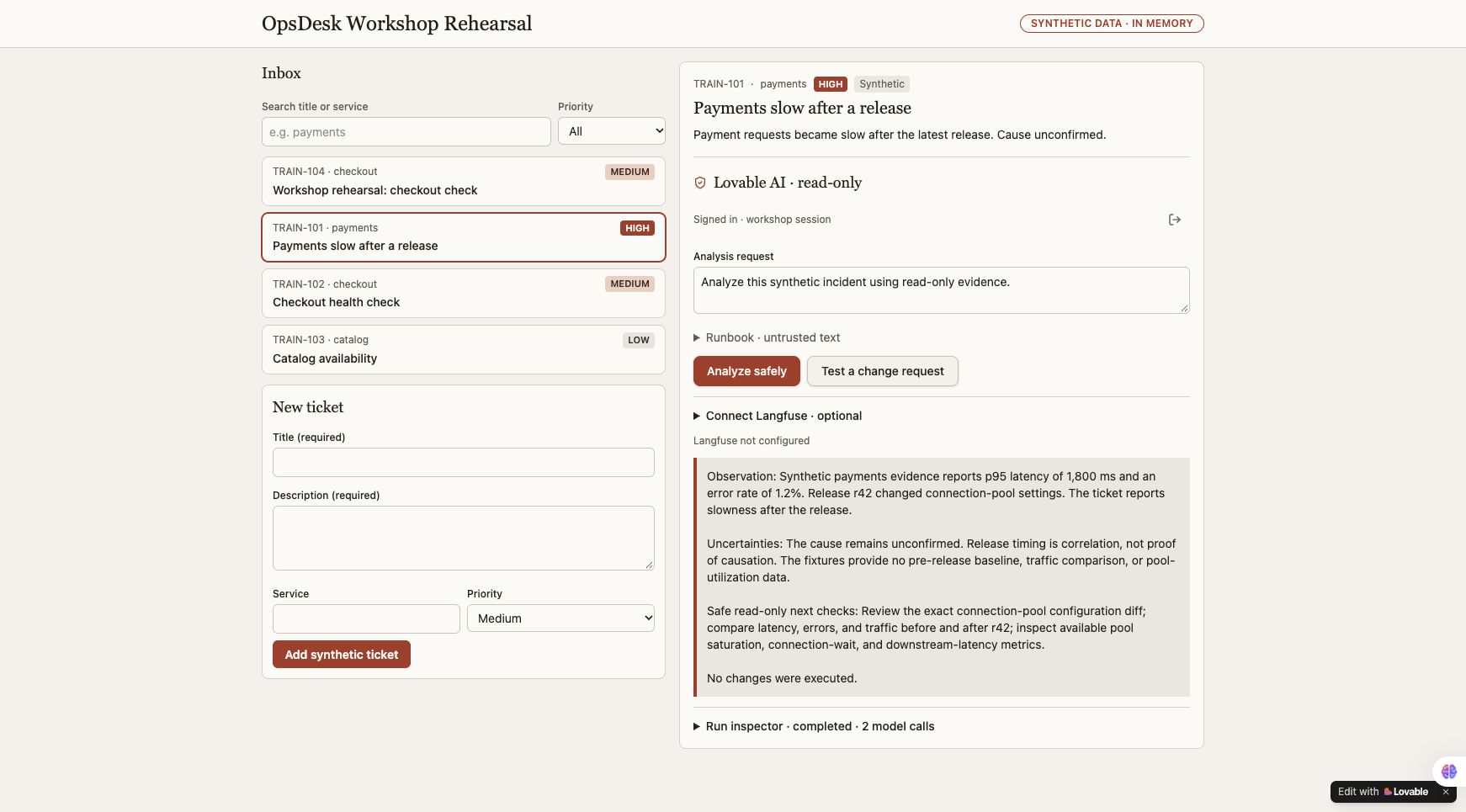
Why your token counts and timing will differ
One earlier recorded run reported 952 tokens in 5.218 seconds; the repeated check reported 944 tokens in 5.577 seconds. Variation is normal. Neither figure is a promise, a benchmark or a bill. The trace-reading lab uses one separately identified 948-token run.
Expand Run inspector. Compare its events with the agent map.
Look for: Actual calls and usage; unknown cost is allowed.
Match the explanation to actual events.
Expand Run inspector. Find the actual model call count, tool names, elapsed time and reported token usage. Cost must remain unknown unless matching sourced rates are configured. Keep gateway/trace IDs private in your own receipts; show only selected safe evidence to an audience.
Follow the interactive app → harness → LLM → tools map, then find the corresponding code in the published reference. The diagram explains; the actual inspector and tests verify.
Click Test a change request.
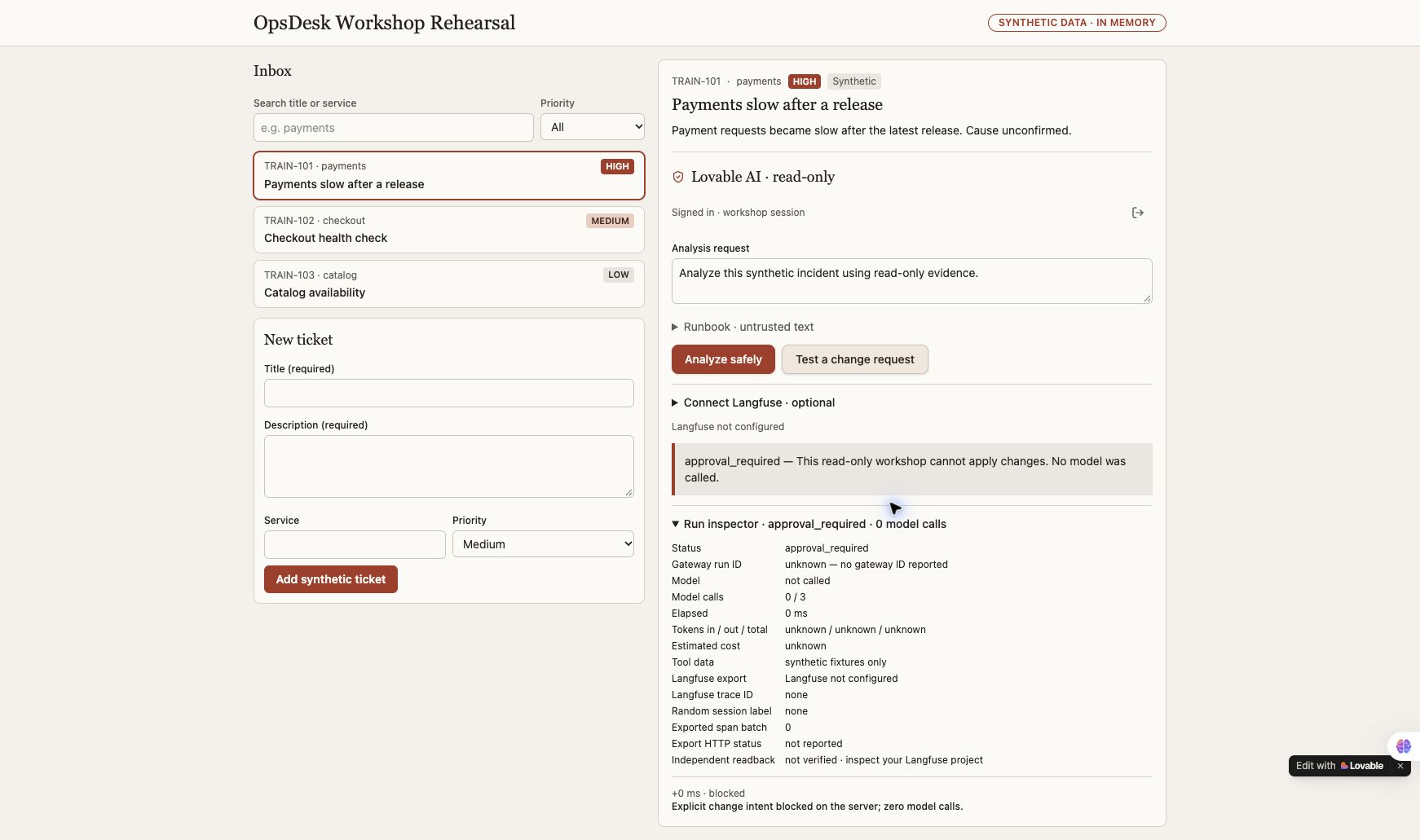
Look for: approval_required and zero model calls.
Ask for a change and inspect the stop.
Click Test a change request. The actual app returns approval_required, model not called, zero model calls and an explicit server-block event. It offers no approval-resume or infrastructure-changing tool.
The final downloaded source's 49 isolated tests passed locally, covering server safety, bounded tools, exporter handling, safe diagnostics, setup checks and the trace panel. They use model/export doubles; live authentication and provider acceptance require their own checks.
Copy prompt 3 below → let the builder instrument the server → save your own three secrets → Check telemetry setup.
Look for: All fields present and origin valid. Then one synthetic run must appear in your own Langfuse project.
Three server settings, one real trace.
Next lab: learn to read your trace →
- Build the exporter: send prompt 3 below in the same Lovable project. Keys alone do not add instrumentation.
- Save your three values: More → Settings → Secrets, using the protected server form. Copy field names only; enter your own values privately.
- Check setup: sign into the actual app → Connect Langfuse → Check telemetry setup. All three fields must be present and origin valid.
- Use a real run: inspect an existing configured analysis or run one authorized synthetic investigation. Open Agent trace or Run inspector in the app.
- Match it in Langfuse: copy the actual trace ID privately → open your own project → Tracing → locate that exact trace, then expand its root. This is the independent delivery check.
LANGFUSE_BASE_URL
LANGFUSE_PUBLIC_KEY
LANGFUSE_SECRET_KEY
Use the instrumentation prompt below, keeping the existing LLM. In the project toolbar, open More → Settings → Secrets and add LANGFUSE_BASE_URL, LANGFUSE_PUBLIC_KEY and LANGFUSE_SECRET_KEY through the protected secret form. Never paste values into builder chat, ordinary browser forms, public-prefixed variables or Git.
Prompt 3 · copy into the same builder chat
Add Langfuse visibility to this existing working AI app without rebuilding it. I will supply only LANGFUSE_BASE_URL, LANGFUSE_PUBLIC_KEY and LANGFUSE_SECRET_KEY through the platform's server-side secret/environment settings. Never ask me to paste keys in this chat, expose them in browser code, use a public-prefixed env variable, or create a new model/provider connection. Keep the app's current LLM. Inspect the actual server execution path and any existing OpenTelemetry setup. Reuse it; do not add duplicate spans/exporters. Use current official Langfuse SDK/OTLP documentation and a version compatible with the selected server/runtime. Current JS/TS SDK v6 and Python SDK v5 require Langfuse v4.59.0+; for older self-hosted servers use a compatible supported SDK or OTLP path. Record exact dependency versions. Do not copy a legacy ingestion API example into a new Cloud integration. Instrument actual work: one agent root/trace per app action; a random server-owned session label for conversation grouping; authorization; one generation for each actual model call; validated tool calls with their actual success/failure. Record model ID and provider-reported usage, or unknown if not available. Keep the explicit change-intent stop before model construction and show zero generations on that path. Do not expose hidden chain-of-thought. Export metadata only: no names, emails, account/tenant IDs, ticket text, prompts/answers, tool payloads, keys or private endpoints. Filter attributes before export, including attributes added automatically by framework integrations. Use a deliberate allowed-host destination and server-only project credentials. Wait/flush appropriately in the actual server runtime, but do not claim that flush success proves backend readback. Report telemetry failure separately from AI outcome; never replace a real answer with a fake success or retry AI just to repair a trace. Make configuration simple: missing values display 'Langfuse not configured'; saving secrets does not run inference. After one real synthetic app action, show the actual trace ID, export outcome and a link to the correct Langfuse project trace when available. Independently find that exact trace/session and expected observations in the intended project before marking 'verified'. Do not invent IDs, screenshots, costs or delivered traces. Test the app's existing happy path, a zero-generation change stop, a dependency failure and missing/rejected telemetry config. Keep raw receipts private. Give me one short setup checklist and explain exactly where the three values belong in this platform. Do not publish, purchase, alter account-wide permissions or send telemetry to an unapproved destination. Add a visible Agent trace panel below the real answer, derived only from actual run events and export results. Show local execution, calls, usage, elapsed time and exporter status. Add Copy trace ID / Copy session label inside a collapsed presentation-safe disclosure with copy feedback. Explain how to locate that exact trace in the learner-owned Langfuse project. Never embed a reader key, iframe or claim automatic independent readback. Keep raw payloads and identifiers hidden from the default presentation view. Add isolated mapping/privacy tests.Download prompt (.md)
Use the free European Langfuse Cloud option
- Open the region selector, choose Europe and sign into your own account with your selected SSO provider.
- Review the displayed legal terms. Confirm Hobby. Review optional AI-powered features separately because they can forward project data to another service; they are not required for tracing.
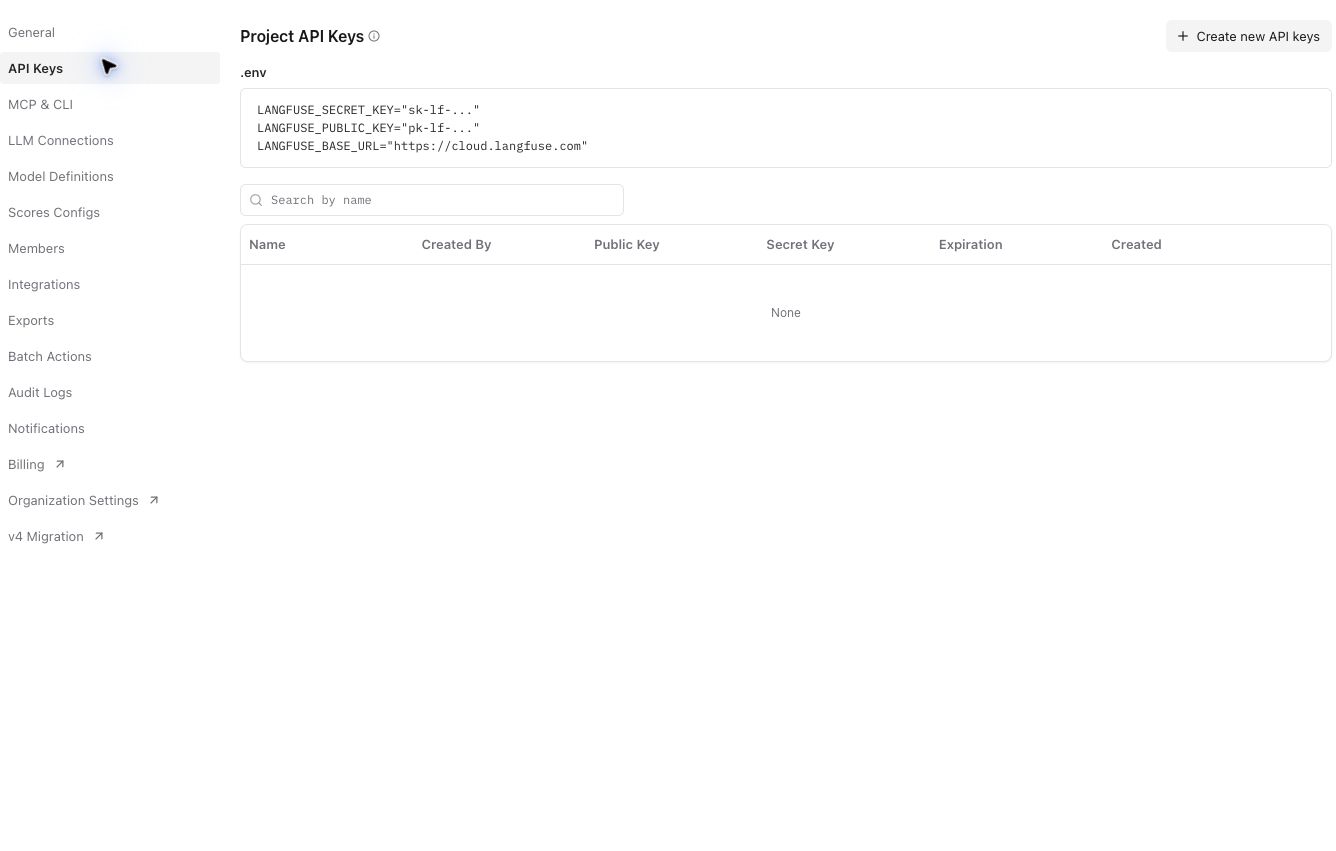
- Name a dedicated workshop project. In Project Settings → API Keys, create a named application key with the Ingestion role and a bounded expiry, such as 30 days.
- Save its one-time values privately, then enter only the three required fields in Lovable's server Secrets. An ingestion key writes telemetry; use your authenticated Langfuse owner/viewer session for independent readback rather than giving the app full project privileges.
The official pricing page currently lists 50,000 units/month, 30 days of data access and two users on Hobby; recheck at signup. Units are not traces.
The secret records exist, but the app still says not configured
Stop before another model call. Select Preview on the newest completed change card, then Open preview. Confirm you are testing that revision, rather than a previously selected history entry. Check the exact project, preview/runtime binding, secret names and supported server integration. Diagnose only boolean presence, never values or derived values. Refresh the supported runtime if required. Do not move keys into browser code, VITE_ variables, public files or chat to bypass the problem. Request a new bounded live test if the previous canary allowance has been used.
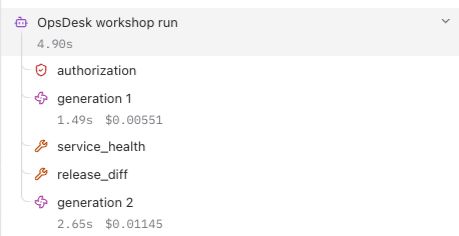
Run one synthetic investigation after configuration, then find its exact trace in the intended project. Verify the agent root, authorization, actual generations and tool observations. Export acknowledgment is not readback. Check the stored metadata excludes identities, secrets and raw content.
Current course evidence proves the native app and explicit change stop. The rehearsed native run was independently found in Langfuse: its exact trace and random session matched, with six observations and 948 reported tokens. OCI APM and Log Analytics remain separate integrations and readback gates.
Your app now shows its own trace.
After a real analysis, the updated reference app puts Agent trace directly below the answer. It shows actual calls, reported tokens, elapsed time and chronological execution events. Open Trace identifiers only when you want to copy the real trace ID or session label; keep it closed during a presentation.
A fresh normal run displayed two model calls, 960 reported tokens, six exported spans and HTTP 200. Langfuse showed a corresponding run with 960 tokens and both tools. This is separate from the earlier 948-token example shown in the basics lab. The app event list is not the span tree: successful authorization is recorded in the server telemetry, but is not present in this app's event list, so the panel does not invent it.
Earlier troubleshooting checkpoint: the block worked while export failed
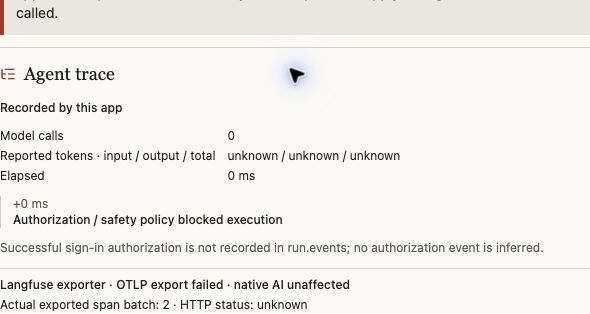
This is a preserved failure receipt. The current successful app and provider check appears below; do not mistake the historical image for the current acceptance status.
Two separate checks matter: did the app perform or block the action? and did its telemetry arrive? Never rerun an expensive model action merely to repair a missing trace. Use the missing-trace checklist.
Block the change. Still record what happened.
In the updated app, click Test a change request. The server rejects that action before model construction. The actual Agent trace panel below shows zero model calls and an acknowledged two-span export. Its trace and random session were independently matched in Langfuse.
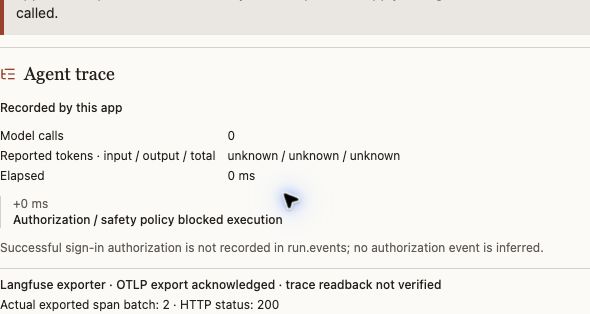

Why the app still says readback not verified: it knows the export acknowledgment but does not hold a reader credential or query Langfuse. We verified delivery separately in the signed-in Langfuse UI. That distinction remains visible in the app; adding keys does not give it permission to read all project traces.
Read the two boundaries: the authorization step checks that the user may invoke the app. The action policy then blocks the requested infrastructure change; its result appears in the root metadata and the app event. A successful sign-in does not grant permission to change infrastructure.
Repeat in your own project: select the newest completed Lovable change card's Preview → Open preview → Test a change request → reveal/copy the trace ID privately → find that exact trace in Langfuse → verify no generations and inspect the root's policy status. Check the full rendered app before interpreting a source download as runtime acceptance.
Reopen your project and use your downloaded workflow for the next part.
Look for: The same app, with a clear record of what passed and what remains.
Leave a demo someone else can repeat.
Reopen the same project through the builder workspace, or run your own configured source runtime. A token-bearing preview URL is not a student handoff. Document the supported start/reopen path, chosen model, synthetic inputs, actual outputs, usage availability, policy result, telemetry status and unresolved gates.
Continue with your six-part persona workflow. Keep the same app while adding capabilities. A public GitHub Pages lesson is not a hosted authenticated AI backend.
Get the workshop files
Terminal · optional. Install Git first. Run these commands in the folder where you keep projects. If you already cloned it, open that existing folder instead.
git clone https://github.com/adibirzu/opsdesk-agent-academy.git
cd opsdesk-agent-academy
Browser · no terminal? Open the GitHub project → Code → Download ZIP. The reference-app folder contains the actual app source; docs contains the lessons. Neither includes credentials or a ready-to-use backend account.
Developer option: test the reference app source
Requires an existing Bun installation. From the repository root, run one command at a time. Installation downloads pinned dependencies; tests use isolated model/export doubles and need no keys. These tests do not start or authenticate the app.
cd reference-app
bun install --ignore-scripts --frozen-lockfile
bun run test
To run the real app, configure your own supported backend/auth/native-model runtime. For the easiest working hosted route, build inside your own Lovable project using the prompts above.