Meet the app you will build.
OpsDesk turns a synthetic incident into a grounded, read-only investigation. Build its visible inbox first. Then add a bounded engine, measurements, observability, security tests and a reviewed hosting plan.
The real Lovable rehearsal uses its native server and available model. The optional Python engineering route is a separate implementation of the same learning goals. This static site is a guide; it never signs you into the presenter’s app or runs a model.
Build your own app → Exact rehearsal recipe (.md) Try the clearly labeled UI-only preview
A useful inbox, then a real answer
Help an operator investigate a synthetic incident without giving the AI permission to change a system.
Try this
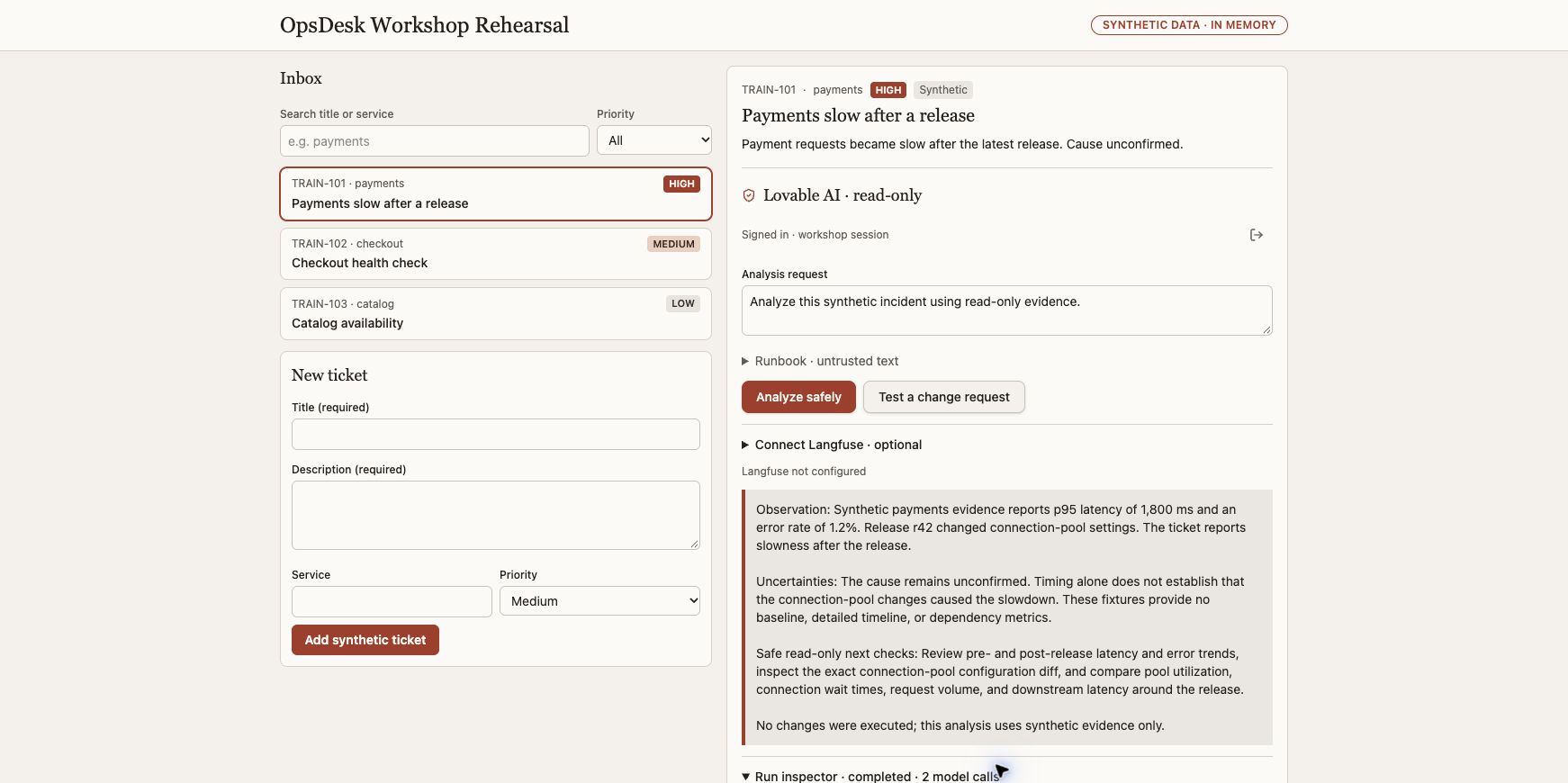
Select TRAIN-101, Payments slow after a release. Request: Analyze this synthetic incident using read-only evidence.
- Create a synthetic ticket; search and filter it.
- Select TRAIN-101 and sign in to the app, separately from the builder workspace.
- Choose Analyze safely once and inspect the returned answer.
What it should look like
A ticket inbox on the left; selected ticket, analysis request and readable answer on the right. Loading, sign-in and failure states are visible.
What a good result says
An actual model answer separates observations, uncertainties and safe next checks. Payments p95 is 1,800 ms and errors are 1.2% in the synthetic fixture. Release r42 is a correlation, not a confirmed cause.
Native Lovable app journey browser-verified; other builders require their own rehearsal.
Still requiredLearners must run their own app; static GitHub Pages never calls a model.
App walkthrough and all expected results → · Reviewed evidence →
Open the engine, keep the app
Make the harness visible: authorization, bounded model loop, validated tools, final answer and trace events.
Try this
Repeat the selected synthetic incident, then test an unknown tool and an argument outside the selected service scope in isolated tests.
- Keep the same inbox and Analyze safely action.
- Inspect the server tool registry and strict argument validation.
- Open the actual run inspector after one successful investigation.
What it should look like
An expandable inspector below the answer shows actual model/tool events. A teaching animation explains these events but is not a live trace.
What a good result says
Only service_health and release_diff can execute in the Lovable example. The observed successful run used both tools and two model calls, below its three-call limit. Rejected tool cases must be checked in code tests.
Actual native model/tool events browser-verified; local harness contracts tested separately.
Still requiredA screenshot cannot prove all tool-validation or injection-resistance properties.
App walkthrough and all expected results → · Reviewed evidence →
Measure the answer, then compare models
Make latency, usage and estimated cost understandable without inventing a price or a winning model.
Try this
Use the same synthetic task for each explicitly selected, available model. Keep tool inputs and limits fixed.
- Read provider-reported input and output usage from the real run.
- Add matching sourced token rates only when available; otherwise show unknown.
- If a second model is available, compare answer quality, tool behavior, latency and usage on the same task.
What it should look like
A compact measurement panel beside the answer. Comparison rows distinguish reported tokens, illustrative arithmetic, estimated model cost and actual provider charges.
What a good result says
The reviewed Lovable run reported 761 input + 191 output = 952 total tokens and 5,218 ms. Estimated cost remained unknown. These are one run's observations, not a benchmark or a bill.
Single-model usage browser-verified; cost arithmetic and missing-usage contracts locally tested.
Still requiredNo live two-model comparison or provider billing readback is accepted for this Lovable rehearsal.
App walkthrough and all expected results → · Reviewed evidence →
Find the same action in Langfuse
See what the agent actually did, while excluding personal data, secrets and prompt content from workshop telemetry.
Try this
Provide LANGFUSE_BASE_URL, LANGFUSE_PUBLIC_KEY and LANGFUSE_SECRET_KEY only through the app's server-side settings.
- Use the three-value instrumentation prompt with your current builder and existing LLM.
- Run one synthetic investigation and retain its actual trace/session identifiers privately.
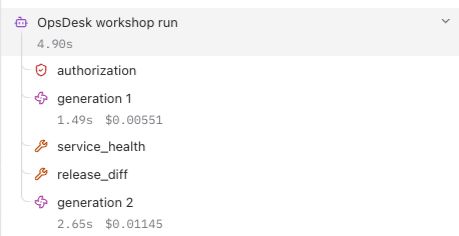
- Find that exact trace in your own Langfuse project and check the root, authorization, actual generations and tools.
What it should look like
Your real Langfuse project shows a trace tree and reported usage. Until configured, the app explicitly displays Langfuse not configured; no imitation dashboard is presented as evidence.
What a good result says
Expected structure: agent root → authorization; generation 1 → tools; generation 2 → answer. Export acknowledgment and independent readback are separate results. OCI APM spans and Log Analytics events require their own configured destinations and readback.
Native Lovable normal-run and zero-model policy traces independently verified in Langfuse by exact trace/session correlation. Final downloaded app source passes 49 isolated tests.
Still requiredRepeat configuration and exact readback in your own project. OCI APM and Log Analytics require separate export and provider acceptance; they are not proved by these Langfuse checks.
App walkthrough and all expected results → · Reviewed evidence →
Ask for a change and watch it stop
Demonstrate that permission decisions belong in server code and every tool boundary, not only in a system prompt.
Try this
Choose Test a change request in the authenticated app. Exercise malformed tools and controlled dependency failures in isolated tests.
- Keep the working investigation path.
- Trigger the explicit change-request control and inspect its response.
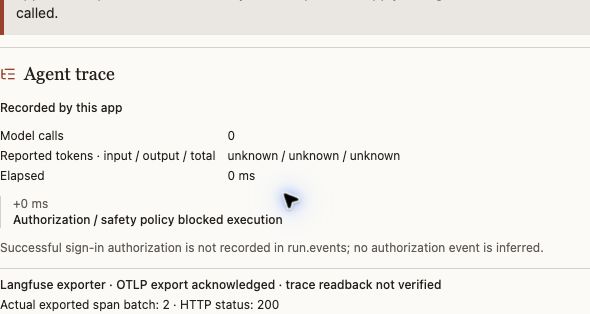
- Verify zero model calls, then examine local tests for unknown tools, malformed arguments and safe failures.
What it should look like
A clear refusal beside the original ticket, with a zero-call inspector. Failures stay visible instead of being replaced with a fake answer.
What a good result says
approval_required; model not called; model calls 0 / 3. The actual app inspector reports an explicit server block. There is no automatic approval-resume or system-changing tool.
Explicit change stop browser-verified with zero model calls; its exact two-observation Langfuse trace independently matched with no generations. Broader negative cases are locally tested.
Still requiredThis is not proof of universal prompt-injection prevention, production IAM enforcement or a complete application security audit.
App walkthrough and all expected results → · Reviewed evidence →
Prepare a hosted release you can verify
Move the working agent to an approved runtime with a defined identity, secrets, limits, health checks, rollback and observability.
Try this
Use your own reviewed OCI scope and supported agent-hosting option; preserve the existing app and runtime compatibility.
- Review OCI AI Platform options and the Private Agent Factory walkthrough; confirm the selected runtime supports your app.
- Prepare a deployment plan and exact resource/cost inventory before requesting deployment authority.
- After an approved deployment, repeat create → select → analyze → change stop, then independently read back telemetry and test rollback.
What it should look like
A deployment checklist showing source, artifact, runtime, canary, telemetry and rollback separately. Missing cloud access remains visibly pending.
What a good result says
A reviewed release packet with immutable artifact identity, permissions, secret references, health and canary results, exact telemetry readback and rollback procedure. A rendered plan alone never satisfies this gate.
Local deployment/readiness contracts tested; this course's new hosted capstone is not live accepted.
Still requiredRequires current cloud access, named resources, deployment authority and a fresh signed-in canary/readback. Existing older deployments do not prove this app release.
App walkthrough and all expected results → · Reviewed evidence →